


Hammer AI is an AI character-chat platform designed for roleplay, storytelling, and personalized conversations. Unlike traditional chatbots, it allows users to create fictional characters, customize personalities, and interact with different AI models. Its standout feature is local AI processing, which lets supported desktop users run conversations directly on their computers.
In 2026, Hammer AI offers web, desktop, and mobile access, along with image generation, group chats, and creative writing tools. However, its pricing, privacy settings, and performance deserve a closer look before getting started.
What Is Hammer AI?
Hammer AI is a creative chatbot platform focused on character-based conversations and interactive fiction. Users can communicate with community-created personalities or design original characters with specific backgrounds, behaviors, and speaking styles.
The platform supports both cloud-hosted and local language models. This flexibility appeals to creative writers, roleplay enthusiasts, and users interested in controlling how their AI conversations are processed.

Image by AI
How Does Hammer AI Work?
Hammer AI uses large language models (LLMs) to generate responses based on character descriptions, conversation history, and user instructions.
Its desktop application supports Ollama, allowing compatible AI models to run locally. Once configured, these models can generate text without continuously connecting to remote servers. However, larger models require additional RAM, processing power, and storage.
Cloud models offer a simpler alternative. They process messages remotely, reducing hardware requirements but requiring an internet connection. Users should understand this difference because it directly affects privacy and performance.
Key Features of Hammer AI
Hammer AI combines several creative tools within one interface. Its most useful features include:
- Custom Characters: Create personalities with detailed backgrounds and conversation styles.
- Group Chats: Bring multiple AI characters into one fictional conversation.
- Lorebooks: Store information about fictional locations, characters, and story settings.
- User Personas: Define your identity within a roleplay conversation.
- Image Generation: Create character portraits and illustrations.
- Text-to-Speech: Convert supported responses into spoken audio.
- Model Selection: Choose compatible local, cloud, or external AI models.
Lorebooks are particularly helpful for longer stories. For example, a writer developing a fictional kingdom can save its history, locations, and characters to improve consistency across conversations.
How to Use Hammer AI
Getting started is straightforward, especially through the browser version.
- Visit the official website at hammerai.com.
- Browse existing characters or create a personalized character.
- Select an available AI language model.
- Start chatting or developing an interactive story.
- Adjust character settings, personas, and lorebooks when needed.
Desktop users interested in offline conversations must install the necessary software and download a compatible local model. Basic local chatting does not require an account, although cloud-related features may require registration.
Hammer AI Pricing in 2026
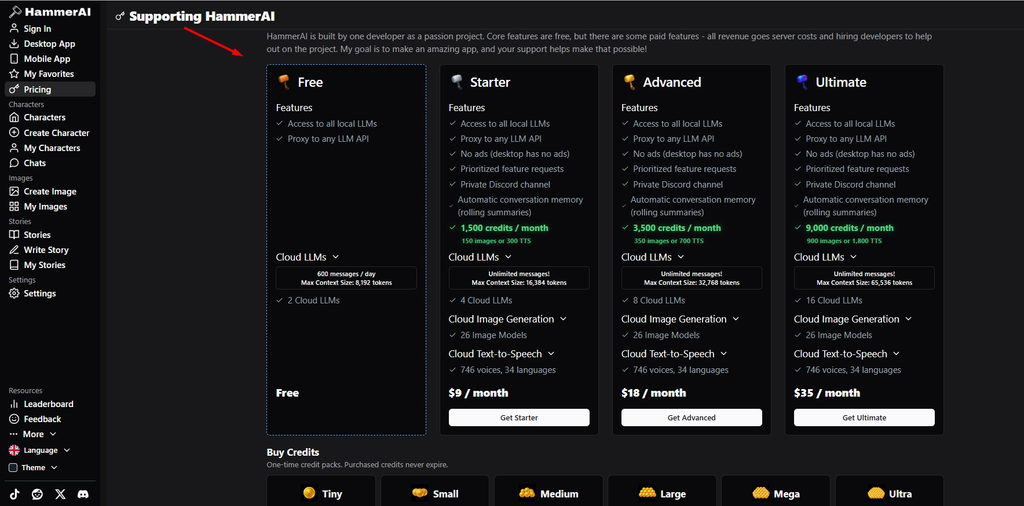
Hammer AI offers a free plan alongside paid subscriptions. Premium options provide larger context windows, expanded cloud access, and credits for creative features.
| Plan | Monthly Price | Cloud Messages | Context Limit |
|---|---|---|---|
| Free | $0 | 600 daily | 8,192 tokens |
| Starter | $9 | Unlimited | 16,384 tokens |
| Advanced | $18 | Unlimited | 32,768 tokens |
| Ultimate | $35 | Unlimited | 65,536 tokens |
Paid subscriptions also include credits for image generation and text-to-speech. Published allowances and subscription details may change, so checking the official pricing page before purchasing is sensible.
For occasional character conversations, the free plan may provide sufficient functionality. Frequent cloud users may benefit from longer context limits and additional features.
Is Hammer AI Safe and Private?
Privacy depends largely on the selected AI model. Local conversations can be processed on the user’s computer, reducing the need to transmit messages to external AI servers.
Cloud conversations work differently because remote providers process the messages. Hammer AI’s privacy policy states that the company does not use conversations to train its own models, although third-party providers may follow separate data policies.
The platform’s free tier may also share limited conversation information for contextual advertising. Users handling sensitive material should prefer local processing, review privacy settings, and avoid submitting confidential information.
Local storage and local AI processing are not the same thing. A conversation saved on a device may still have been processed through a cloud model.
Benefits and Limitations
Hammer AI’s biggest advantages are character customization, flexible model selection, and creative storytelling features. Local processing also appeals to people who want greater control over their conversations.
However, the experience is not without limitations. AI characters can forget details, produce repetitive dialogue, or behave inconsistently during lengthy conversations. Local models may run slowly on older computers, while certain image and voice features require cloud access or paid credits.
Advanced settings can also feel complicated for first-time users.
Hammer AI vs Character AI
Both platforms support fictional conversations, but their approaches differ.
| Feature | Hammer AI | Character AI |
|---|---|---|
| Character creation | Yes | Yes |
| Local AI models | Supported | Primarily cloud-based |
| Offline chatting | Possible on desktop | Generally unavailable |
| Model customization | More flexible | Mostly platform-managed |
| Main strength | Control and customization | Convenient character chatting |
Character AI may suit users who prefer a simpler hosted experience. Hammer AI offers more flexibility for those interested in local models, custom roleplay settings, and technical adjustments.

Image by AI
Best Hammer AI Alternatives
Several platforms offer similar character-based experiences.
Character.AI focuses on accessible conversations with fictional personalities. Chai provides mobile-oriented AI character chatting, while Janitor AI emphasizes customizable roleplay interactions.
For technically confident users, SillyTavern offers advanced character-chat configuration and support for different AI backends.
The best alternative depends on privacy requirements, available features, and ease of use.
Common Hammer AI Problems
Slow conversations often result from running large local models on limited hardware. Selecting a smaller model or closing memory-intensive applications may help.
If characters forget important story details, reviewing lorebook entries and simplifying instructions can improve consistency.
Cloud connection failures may involve internet problems or temporary service interruptions. Updating the desktop application and its local model dependencies can also resolve compatibility issues.
Is Hammer AI Worth Using in 2026?
Hammer AI is a practical choice for creative writers, roleplay enthusiasts, and users interested in customizable AI conversations. Its local model support provides flexibility that many cloud-focused character platforms do not offer.
The free version is a reasonable starting point, particularly for casual chatting. Paid plans make more sense for users who regularly need cloud models, longer conversations, or creative media tools.
Overall, Hammer AI is worth exploring in 2026 for its combination of character customization, storytelling features, and local AI capabilities. Choosing the right model and understanding its privacy settings are essential for getting the best experience.
Explore More Interesting Stories Like Laura Cover’s
- Rebecca Grossman Net Worth: What the Public Records Reveal
- Nick Shirley Net Worth 2026: YouTube Earnings, Career, and Personal Life
FAQs
Is Hammer AI free to use?
Yes, Hammer AI offers a free plan for character chatting and roleplay. Users can access supported AI models without paying, although cloud messaging limits and some advanced features require a subscription.
Can Hammer AI work without an internet connection?
Yes, Hammer AI supports offline conversations through compatible local AI models on desktop computers. Users must download and configure the necessary models first. Cloud-based chatting, image generation, and certain voice features still require internet access.
Is Hammer AI safe for private conversations?
Hammer AI offers local processing, which allows supported conversations to remain on the user’s device. However, cloud models send messages to external servers. For better privacy, users should select local models and avoid sharing sensitive personal information.
